
What is an Online Compass or Real Time Directional Indicator?
An online compass is an electronic analog of a magnetic compass for determining the sides of the world, which only requires a smartphone with GPS functionality.
What directions does a compass point?
Any compass, whether virtual or magnetic, is needed to determine the sides of the world: North, South, West and East. The corresponding letter marks will be located on the edges of the compass: North will be at the top, South at the bottom, West and East on the left and right sides respectively. Some compasses also indicate intermediate directions: northeast, southeast, southwest, and northwest.
And remember the main function of a compass – the red arrow always points north!
What are the Differences between a Digital Compass and a Mechanical Compass?
The only real difference is the principle of their work: the Internet compass works due to the GPS signal, which catches your phone, while the gyroscopic compass works based on the magnetic field of the earth and the magnetized arrow.
The web compass and its mechanical counterpart have a number of advantages and disadvantages that can be decisive in different situations. It is important to clearly understand for what purposes and under what conditions you will need to determine the sides of the world. If your life and health may depend on it, it is recommended to take both devices with you.
Real Time Compass or Magnetic Compass?
| Virtual compass (GPS) | Classic compass |
| Free (you don’t spend any money to buy one) | You can’t buy a reliable compass cheaply. |
| Compass is already in your phone | The compass will become another device in your pocket or backpack. |
| Will turn off with your phone | Will work permanently if it is not damaged |
| Visible at night | In the dark you can’t always distinguish the direction of the arrow. |
Advantages of the Internet Compass
- You don’t need internet to use it, so you don’t spend money for using it.
- No installation or downloading, so you can use it now.
- The accuracy is the same as a regular compass
- Language versions are available for different countries
Who can use an online compass?
- Sailors
- Military
- Archeologists
- Geologists
- Tourists
- Also some types of compasses are used in aviation
How to Enable Compass on Your Browser?
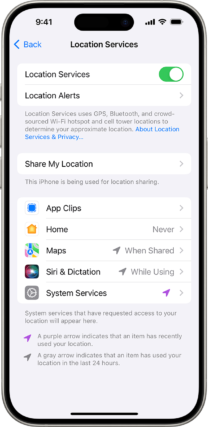
On your iPhone or iPad
- Tap “Settings” “Privacy” “Geolocation Services.”
- Tap a browser app, such as Safari Websites or Chrome.
- Select location access for the browser app: “When using the app”, “Ask next time”, or “Never”.
Read more: https://support.apple.com/en-us/102647

On Android
- Open Settings.
- Tap “Location.”
- Enable or disable the “Use location” option.
Read more: https://support.google.com/chrome/answer/142065?hl=en


Why is the online compass not working on my device?
Common reasons:
- Your browser does not support the necessary web standards
- Your smartphone is not equipped with the necessary sensors
- You have not given the web page permission to access the sensors.
- There are sources of electromagnetic interference nearby that interfere with the compass.
What should I do if the online compass shows the wrong direction or does not turn on at all?
- Check the geoposition on your phone
- Place your phone parallel to the ground (horizontal)
- Move away from sources of electromagnetic interference, such as electronics or metal objects.